

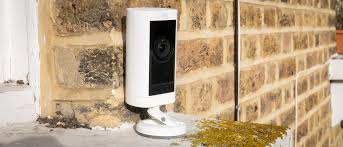
Ring Stick Up Cam battery life is a common concern for homeowners who want reliable security with minimal maintenance. The longevity of the battery depends on how you use the camera, where you place it, and the settings you choose. In this guide, we break down the factors that influence battery life and offer practical steps to maximize the time between charges. Understanding the ring stick up cam battery life is essential for planning camera coverage, scheduling recharges, and deciding whether to add a solar panel or upgrade to a different model. If you want a concise reference, you can follow the linked resource that specifically covers this topic.
What affects battery life
Several variables influence how long the battery lasts between charges. Temperature extremes can temporarily reduce capacity, especially in very cold or hot environments. High activity levels—frequent motion alerts and long live views—draw more power. Streaming 1080p video over a weak Wi‑Fi connection also increases energy use due to retrying transmissions and higher processor load. The camera’s age and the health of the battery itself matter too; older packs hold less charge and recharge more slowly. Finally, whether the camera is set to record continuously or only on motion affects overall drain. If you frequently use night vision, continuous lighting can add to daytime energy consumption as well.
How to maximize battery life
- Adjust motion sensitivity and use activity zones to limit triggers to important areas.
- Enable smart detections (e.g., people or package detection) to reduce unnecessary video activity.
- Limit live-view sessions; avoid leaving the app streaming for long periods unless you need real-time monitoring.
- Keep firmware up to date, since updates often include power-management improvements and bug fixes.
- Place the camera in a moderate temperature area and ensure the battery is clean, properly seated, and free of corrosion.
- Balance video quality and power by choosing a reasonable resolution if the app offers selectable settings.
- Use the Ring app’s battery status indicators to plan charging before the cycle becomes critical.
Practical tips for long life
If you want to push battery life further, consider pairing the Stick Up Cam with a solar panel. The Ring Solar Panel recharges the battery during daylight, potentially extending periods between full charges and reducing the need for frequent swaps. For properties with intense activity in a single area, a solar option can provide a steady trickle of energy, helping to maintain performance without daily attention. In addition, check for environmental obstacles like direct heat sources or obstructions that could force the camera to work harder to maintain a stable connection.
What you can realistically expect
In typical residential setups with moderate activity, many users report months of life between charges. A well‑tuned configuration with balanced motion and energy‑saving settings can approach six to twelve months per battery cycle under favorable conditions. Homes with high traffic, large outdoor spaces, or severe temperature swings may see more frequent recharges. Always monitor the battery level in the Ring app and adjust your settings as needed to balance safety and power efficiency.
To explore more security camera guides and smart-home tips, visit the TechRiYon homepage.
 Admin
Admin